Check where the item is stored and whether it is equipped. Personal inventory, local storage and a ship’s storage are separate places. Something left at one landing zone is not automatically available at another.
Understand the three storage questions
| Storage | Question to ask |
|---|---|
| Personal | Am I carrying it, and is there room for it? |
| Local | Which landing zone holds it, and am I accessing that location’s storage? |
| Ship or vehicle | Which vessel or storage point contains it? |
RSI’s inventory guide explains these distinctions and the importance of location. Check the location label and capacity before deciding that an item has disappeared.
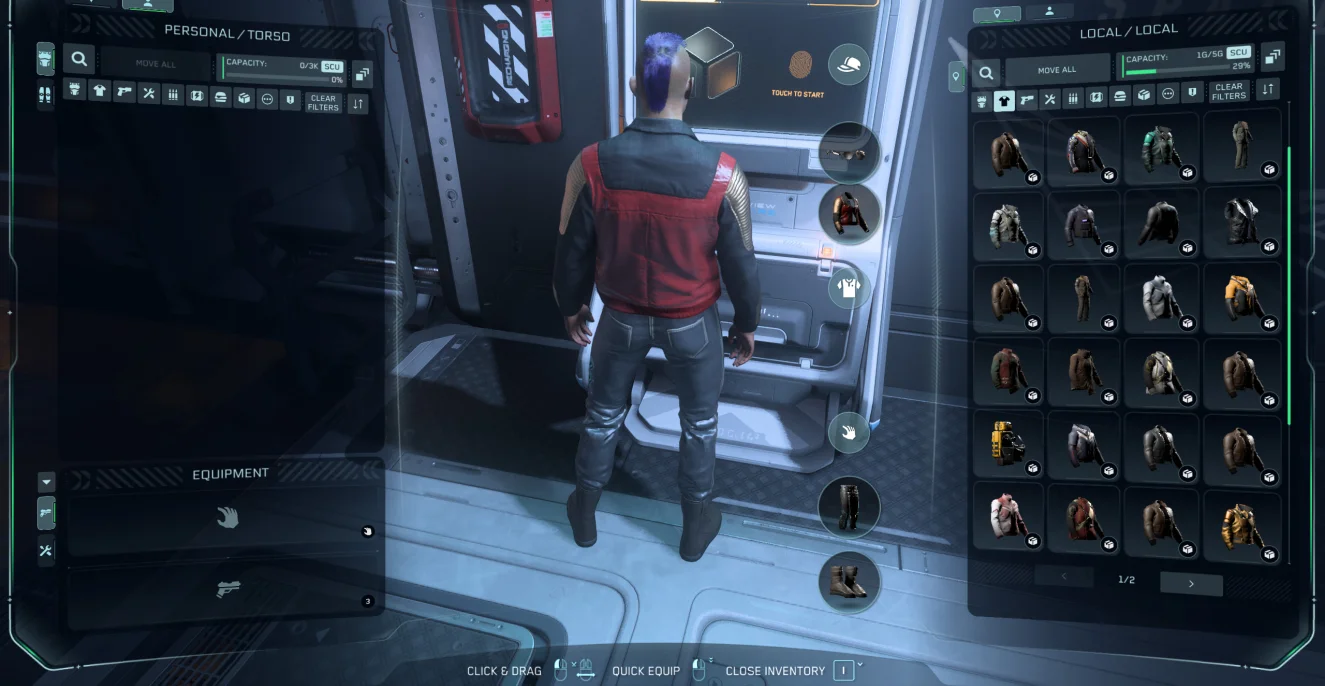
Access local storage at a kiosk
Use a storage access kiosk at the relevant location. RSI identifies kiosks in starting habs and personal hangars, including near the elevators. Its documented defaults are I for personal inventory and F for interacting with a kiosk.
If a list looks empty, remove filters and read the selected storage location. Then check the last place you deliberately stored the item. Buying a duplicate before identifying the location can leave the original item exactly where it was.
Equip the item, not just its storage container
The official equipment guide documents dragging an item to the appropriate character location, using the Equip option, or double-clicking where supported. Follow the prompts shown by your current inventory screen.
- Locate the item in the correct storage.
- Check the slot or equipment layer it needs.
- Use the relevant equip action.
- Confirm the character display or item state changed.
- Check that you can use it before departing.
An item in a backpack is being carried; that alone does not mean it is ready for use. For a short first trip, prepare only the equipment required for the activity you have chosen.
Why is an equip option unavailable?
RSI lists the undersuit, armor layers and the current location among the reasons options can differ. For example, armor or helmet options may depend on wearing an undersuit, while armistice zones can restrict readying weapons.
Inspect the required layer or slot instead of repeating the same drag action. If a control in a guide does not match your setup, check the keybinding screen and current interaction prompts.
Prepare for a setback
RSI warns that death or ship destruction can leave carried items behind and that support does not restore items lost through death. Keep spare equipment in local storage and decide what you actually need to carry.
Before a first mission, note where your spares are and how you will get back to them. The medical and respawn guide explains why the location of your return can matter after an accident.
Official sources
Researched from RSI documentation checked on 15 November 2026. Controls and alpha systems may change; use the current in-game prompts and source articles.